
Quick answer: A solar panel hotspot is a single cell — or a small group of cells — that runs much hotter than the rest of the panel, sometimes by 30°C or more. It happens when a shaded, dirty, cracked, or faulty cell stops producing power and instead absorbs energy from the cells around it, turning that energy into heat. Left alone, a hotspot can permanently damage the cell, crack the glass, melt the backsheet, or in rare cases start a fire. The good news is that most hotspots are preventable: keep panels clean and unshaded, fix cracks early, and get a thermal inspection if your output drops without an obvious cause.
Table of Contents
- What Is a Solar Panel Hotspot?
- What Causes Hotspots on Solar Panels?
- Warning Signs: How to Spot a Hotspot
- Are Hotspots Dangerous?
- How to Check Your Panels for Hotspots
- What to Do If You Find a Hotspot
- How to Prevent Hotspots and Permanent Damage
- When to Call a Professional
- FAQs
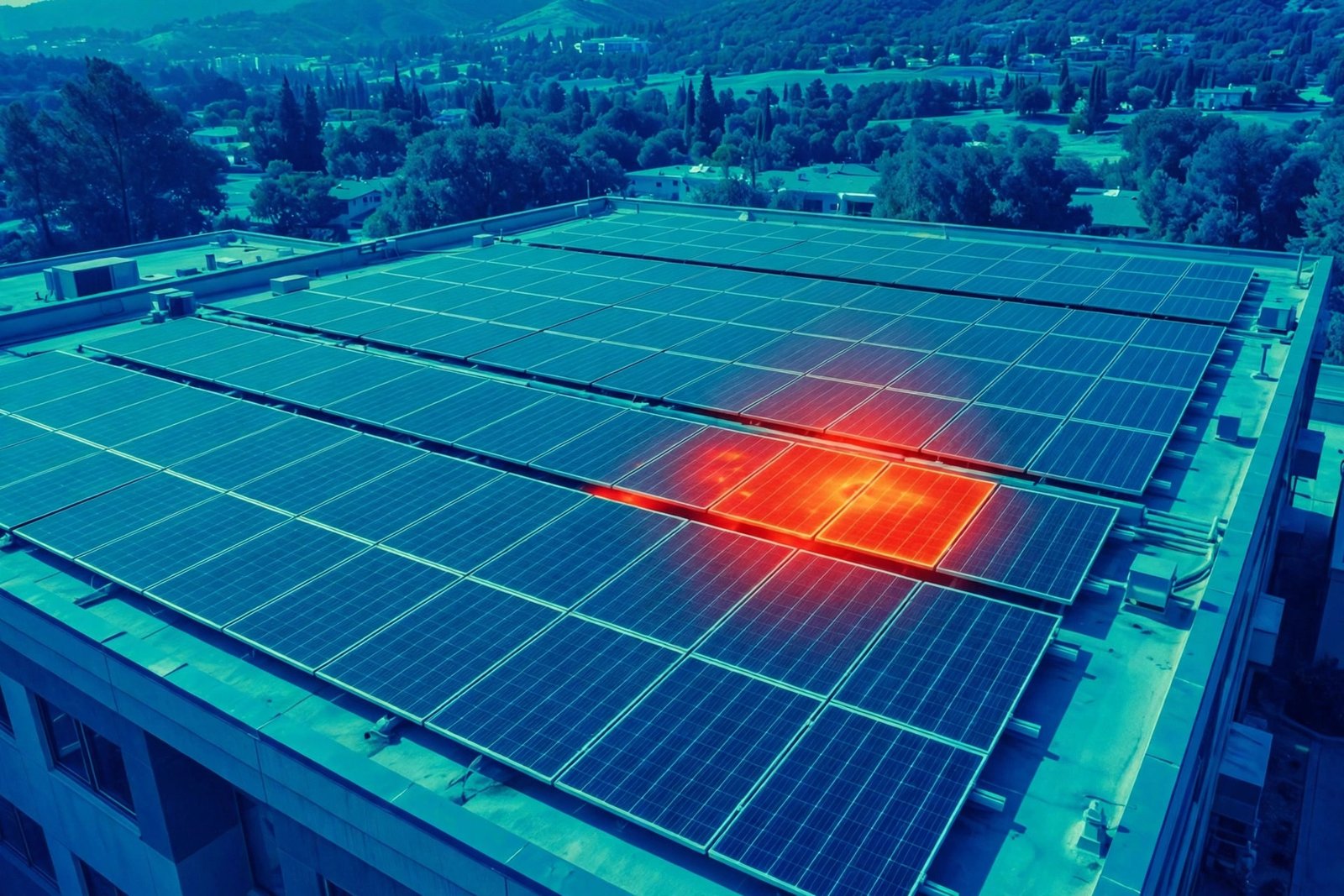
What Is a Solar Panel Hotspot?
A solar panel is made up of dozens of individual cells wired together in series, like a chain. Under normal conditions, every cell produces roughly the same amount of electricity, and the whole panel warms up evenly in the sun — typically 20–30°C above the air temperature on a sunny day.
A hotspot breaks that balance. When one cell produces far less current than its neighbours — because it is shaded, dirty, cracked, or faulty — the other cells keep pushing current through it. The weak cell cannot pass that current on as electricity, so it absorbs it and turns it into heat. That single cell can reach temperatures far above the rest of the panel, sometimes hot enough to scorch the cell, melt the plastic backsheet behind it, or crack the glass above it.
Think of it like a traffic jam: if one lane of a motorway closes, the cars behind it pile up. In a solar panel, the “pile-up” is energy with nowhere to go, and it shows up as heat in exactly one spot — hence the name hotspot.
Hotspots are one of the most common causes of long-term panel damage, and they are also one of the least visible. A panel with a hotspot often looks perfectly normal from the ground, and the system may keep producing power — just a little less than it should. That is why they are worth understanding, even if your system seems fine.
What Causes Hotspots on Solar Panels?
Hotspots almost always start with a cell that is underperforming compared with its neighbours. The most common reasons are:
Partial shading
A shadow from a chimney, tree branch, antenna, or even a bird dropping falling across part of a cell is the single most common cause. The shaded cell produces less current, while the unshaded cells keep pushing full current through it. This is why shading cuts output and also creates the conditions for hotspots — even a small shadow on one cell can matter.
Dirt, leaves, and bird droppings
A patch of dried bird droppings or a clump of leaves stuck to one cell blocks light in exactly the same way as a shadow. Panels in dusty areas or under trees are more at risk, especially if they are not cleaned regularly.
Cracked cells and microcracks
A crack in a cell — from hail, a heavy impact, thermal stress, or poor handling during installation — can isolate part of the cell or raise its electrical resistance. The damaged area heats up under load. A hairline crack you can barely see can be enough, which is why a cracked panel should always be inspected rather than ignored.
Manufacturing defects
Occasionally a cell leaves the factory with a defect: a poor solder joint, a tiny impurity in the silicon, or a mismatch between cells in the same panel. These hotspots often appear within the first year or two of operation, and they are usually covered by the product warranty.
Failed or missing bypass diodes
Every modern panel has bypass diodes in its junction box. Their job is to give current an alternative path around a shaded or faulty group of cells, so the weak cells do not overheat. If a bypass diode fails — usually from overheating itself — that protection disappears, and a shaded cell can quickly become a hotspot.
Loose or corroded connections
A loose MC4 connector or a corroded junction-box connection raises resistance at one point in the circuit. Resistance turns electricity into heat, so the connection point itself can overheat and damage the cells nearby.
Warning Signs: How to Spot a Hotspot
Hotspots are hard to see with the naked eye, but they leave clues:
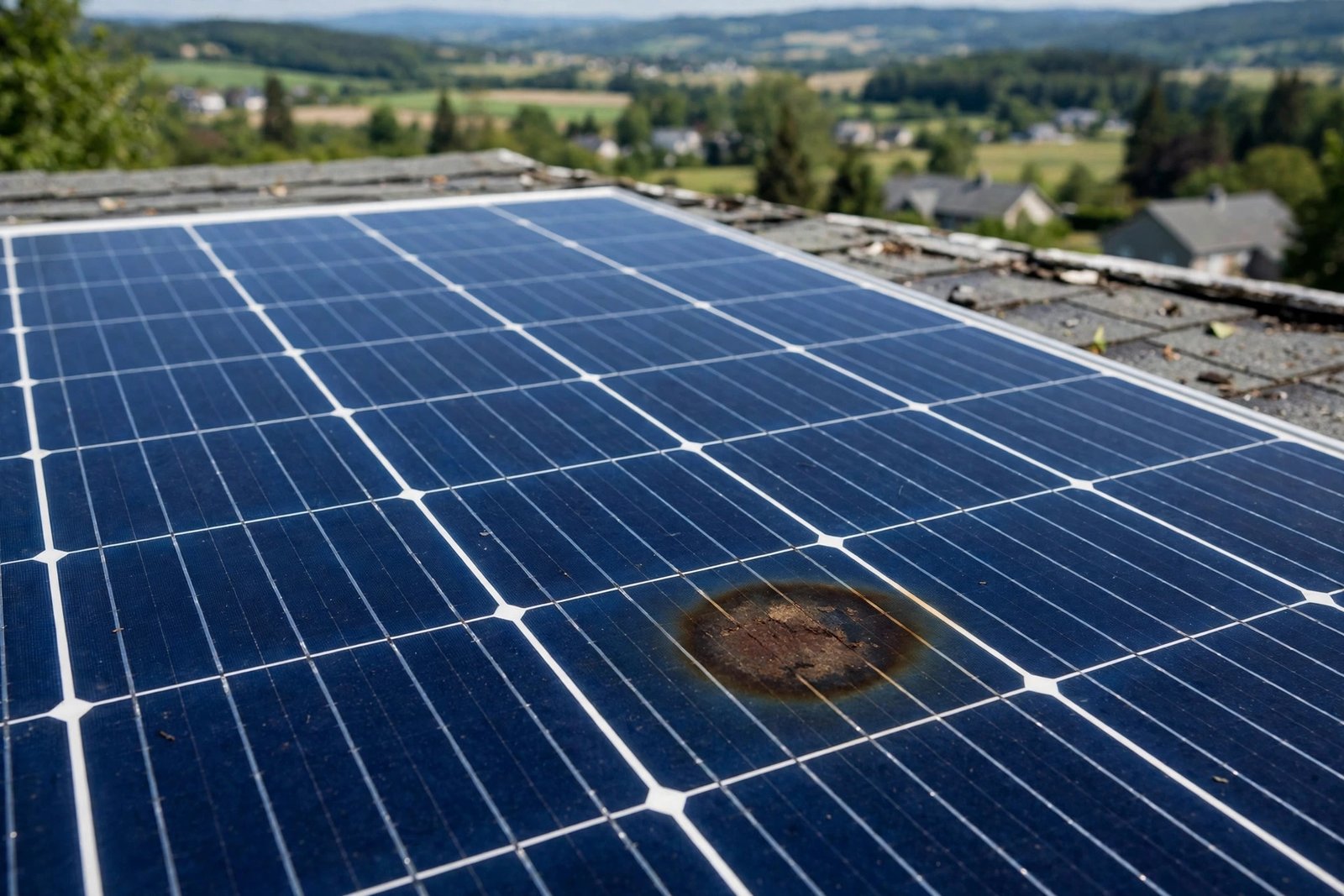
- A brown or discoloured cell. A cell that has turned brown, yellow, or black compared with its neighbours has been overheated. This is the most visible sign and means the damage is already done.
- A burnt or melted backsheet. Look underneath the panel (from the ground with binoculars, or from the loft) for brown scorch marks or bubbling on the white or black plastic backing.
- A crack radiating from one spot. Heat stress can crack the glass above a hotspot, sometimes in a star pattern centred on the overheated cell.
- Unexplained output loss. If your system is not producing enough power and cleaning the panels does not help, a hotspot in one panel could be dragging down its whole string.
- A smell of burning near the array. A faint hot-plastic or burning smell on a sunny day is a warning sign. Switch the system off and call a professional the same day.
- One panel much hotter than the rest. On a sunny day, carefully hold your hand a few centimetres above each panel (never touch the glass directly — it can be very hot). A panel with a hotspot may feel noticeably warmer in one area, though this is only a rough check.
By the time a hotspot is visible as a brown cell, the damage is usually permanent. The goal is to catch the conditions that cause hotspots — shading, dirt, cracks — before the heat does its work.
Are Hotspots Dangerous?
Most hotspots are a slow problem rather than an emergency, but they should never be ignored. Here is what a hotspot can do over time:
- Permanent cell damage. Prolonged heat degrades the cell and its connections. Once a cell is scorched, it will never produce normally again, and the panel’s output falls permanently.
- Cracked glass and delamination. The heat can crack the glass above the hotspot and cause the layers of the panel to separate (delaminate), letting in moisture that causes further damage.
- Melted backsheet and junction box. In severe cases the heat melts the backsheet or damages the junction box, exposing live wiring.
- Fire risk. This is rare, but real: a severe hotspot combined with a failed bypass diode and a cracked or damaged panel can ignite the backsheet. This is why a burning smell or visible scorching should always be treated as urgent.
- Damage to neighbouring panels. A hotspot panel drags down the output of its whole string, and the extra heat can stress the panels next to it.
The risk is highest on older panels, panels with known manufacturing issues, and systems where shading falls on the same cells every day. A well-maintained, unshaded system with working bypass diodes is at low risk — which is exactly why prevention matters so much.
How to Check Your Panels for Hotspots
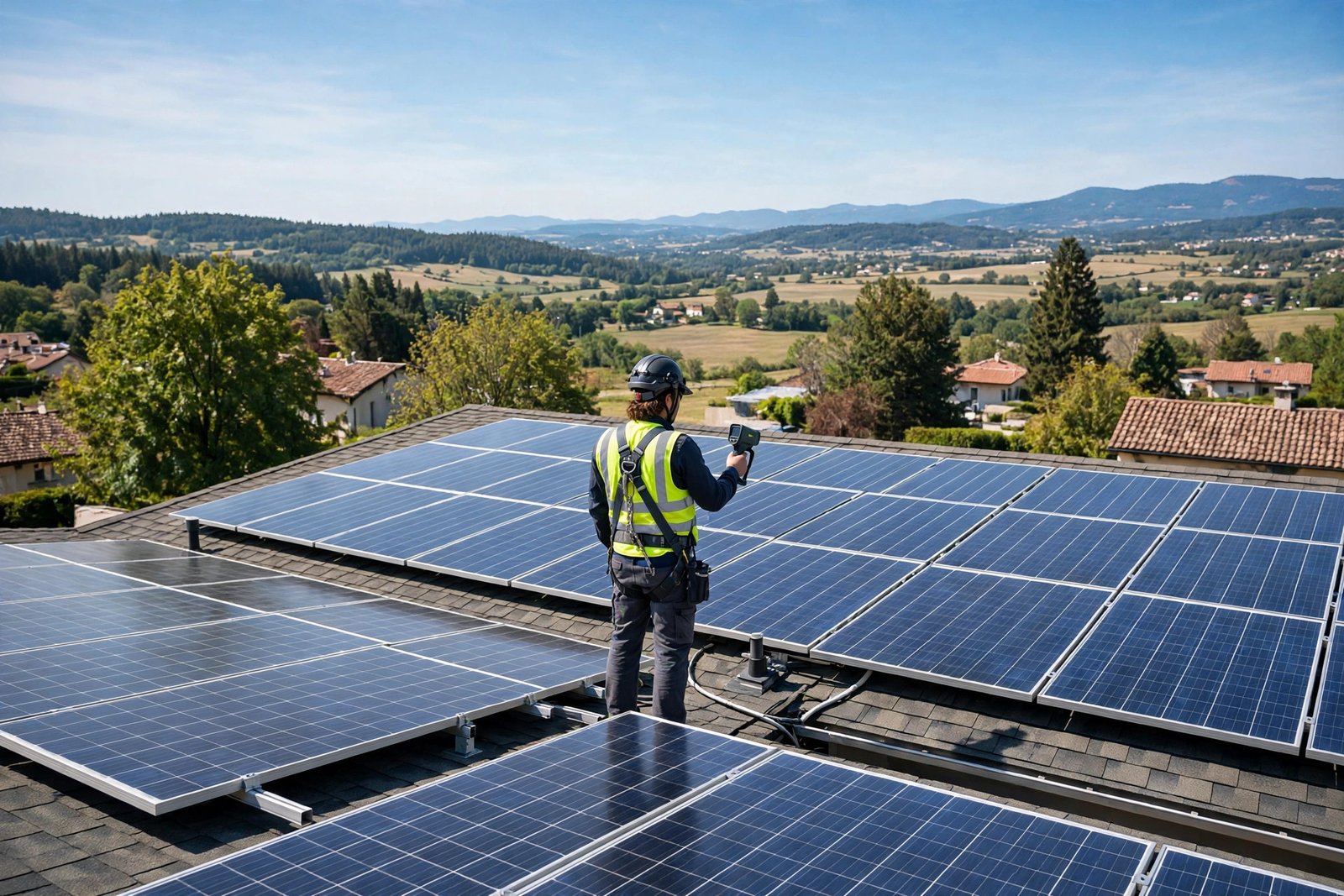
There are three practical ways to check, in order of reliability:
1. Thermal imaging (most reliable)
A thermal camera shows temperature across the whole panel at a glance — a hotspot appears as a bright spot against cooler cells. Professional solar inspectors use handheld thermal cameras, and some use drones for large rooftop arrays. If your installer offers a thermal survey, it is worth doing every few years, or immediately if your output has dropped for no clear reason.
Some smartphone thermal camera attachments exist, but they are less sensitive than professional equipment and harder to use on a roof. They can still be useful for a rough check from the ground on a sunny day, when the panels are under load.
For the clearest results, a thermal scan should be done around midday on a bright, sunny day, when the system is producing at or near full power — that is when a hotspot shows up most clearly.
2. Monitoring data
If your system has panel-level monitoring (microinverters or optimisers), check whether one panel consistently produces less than its neighbours. A panel that lags behind the rest day after day, especially on clear days, is a candidate for a hotspot. With string-level monitoring only, you can still spot a string that underperforms — though you will not know which panel in the string is at fault.
3. Visual inspection from the ground
Use binoculars or your phone’s camera zoom to look for brown or discoloured cells, cracks, bird droppings, leaves, and anything shading part of a panel. Check the underside of the array from the loft or from the ground for scorch marks on the backsheet. Never climb onto the roof to inspect a panel up close unless you are trained and equipped to work safely at height.
If you suspect a hotspot, you can test the panel with a multimeter — but only if you are comfortable isolating the system first and following your manufacturer’s safety instructions. If in doubt, leave the testing to a professional.
What to Do If You Find a Hotspot
What happens next depends on how bad the damage is:
- Remove the cause first. If the hotspot is caused by shading, dirt, or bird droppings, clean the panel or remove the shade. Sometimes that is all it takes — a clean, unshaded cell stops overheating. Do not clean panels with abrasive tools or cold water on hot glass, and never climb onto a wet roof.
- Isolate the panel if you see damage. If a cell is brown or scorched, the backsheet is melted, or the glass is cracked, switch off the inverter and the DC isolator and keep the panel isolated until a professional has looked at it. A damaged panel that stays connected can keep heating up.
- Check the bypass diodes. A technician can test whether the panel’s bypass diodes are working. A failed diode is sometimes replaceable — the junction box on some panels can be opened and the diode swapped — but on many modern panels the junction box is sealed, and the whole panel must be replaced.
- Contact the manufacturer or installer. If the hotspot is caused by a manufacturing defect or a failed diode in a panel that is still under warranty, the manufacturer may replace it free of charge. You will need photos, the panel’s serial number, and ideally a thermal image or a technician’s report. Do not attempt a repair yourself before checking the warranty — opening a panel or its junction box can void it.
- Replace the panel if the cell is scorched. A cell that has been browned or burnt by a hotspot cannot be repaired. The panel must be replaced with one that matches the wattage and electrical characteristics of the others in the same string, so the replacement does not drag the string’s output down.
If your whole string has stopped producing, check the inverter as well — a panel fault can trip the inverter, and you may need to follow the steps in our guide to systems producing zero watts before the array comes back online.
How to Prevent Hotspots and Permanent Damage
Prevention is straightforward, and most of it is the same good maintenance that keeps your whole system healthy:
- Keep panels clean. Clean off bird droppings, leaves, and heavy dust as soon as you notice them — a single dropping on one cell can start a hotspot. A soft brush and clean water are usually enough; avoid harsh chemicals and abrasive pads.
- Trim trees and remove new shade. A tree that was harmless when the panels were installed may now cast a shadow across the array every afternoon. Trim overhanging branches, and check for new shade at different times of day and different times of year.
- Fix cracks early. Any crack in a panel, however small, should be inspected promptly. A hairline crack can turn into a hotspot cell within months, especially in hot weather.
- Check connections at every service. Ask your installer to check MC4 connectors and junction boxes for looseness or corrosion during routine maintenance. A tight, clean connection runs cool; a loose one runs hot.
- Use panel-level monitoring if you can. Microinverters or optimisers let you see each panel’s output separately, so a single underperforming panel stands out immediately — long before a hotspot causes visible damage. If your system only has string-level monitoring, consider adding panel-level monitoring at your next upgrade.
- Get a thermal survey every few years. A professional thermal inspection catches hotspots while they are still invisible, when the fix may be as simple as cleaning a panel or replacing a diode.
- Choose quality panels and installers. Panels from reputable manufacturers with good quality control have fewer cell defects, and a careful installer will not damage cells during handling. If you are planning a new installation, ask about the panel’s hotspot resistance and the warranty terms for cell defects.
- Make sure bypass diodes are part of the specification. Every panel you buy should have working bypass diodes — this is standard on modern panels, but worth confirming on older or budget models.
When to Call a Professional
Call a qualified solar technician or electrician if:
- You see a brown, scorched, or discoloured cell on any panel.
- You smell burning near the array or the inverter, or you see scorch marks on a panel’s backsheet.
- Your monitoring shows one panel consistently producing far less than its neighbours.
- A panel’s output has dropped suddenly and cleaning does not restore it.
- You suspect a failed bypass diode or a loose or corroded connection.
- You need a thermal survey, a diode test, or a panel replacement.
Hotspots sit exactly on the line between routine maintenance and professional repair: cleaning a panel and trimming a tree are safe homeowner jobs, but anything involving the panel’s wiring, junction box, or replacement belongs to a qualified technician. If you are unsure which side of that line you are on, get a professional opinion — a thermal inspection is quick, and it is far cheaper than a replacement panel.
FAQs
What causes hotspots on solar panels?
Hotspots are caused by a cell that produces less current than its neighbours — usually because of partial shading, dirt or bird droppings, a cracked or defective cell, a failed bypass diode, or a loose connection. The surrounding cells push current through the weak cell, which turns that energy into heat.
Are solar panel hotspots dangerous?
Most hotspots cause slow, permanent damage to the affected cell rather than an immediate emergency. But a severe hotspot can crack the glass, melt the backsheet, and in rare cases start a fire — especially if a bypass diode has also failed. Any sign of burning or scorching should be treated as urgent.
Can a hotspot be repaired or does the panel need replacing?
If the cause is shading or dirt, removing it can stop the overheating and the panel may recover. If the cell itself is scorched or brown, the damage is permanent and the panel must be replaced. A failed bypass diode can sometimes be replaced on its own, depending on the panel design.
How can I check my solar panels for hotspots?
A professional thermal imaging survey is the most reliable method — a hotspot shows up as a bright warm spot on the camera. Panel-level monitoring can also reveal a single underperforming panel, and a visual inspection may show brown or discoloured cells, cracks, or scorch marks.
Do hotspots void the solar panel warranty?
Not necessarily. Hotspots caused by a manufacturing defect or a failed bypass diode are usually covered by the product warranty, which typically lasts 10–12 years or more. Hotspots caused by shading, dirt, or physical damage are generally not covered by the manufacturer, though storm damage may be covered by home insurance. Check your warranty terms before attempting any repair.
Hotspots are one of the quietest threats to a solar array: they start with something small — a shadow, a dropping, a hairline crack — and end with a permanently damaged cell. The fix is almost always simpler than the repair: keep your panels clean, keep them out of shade, fix cracks early, and watch your monitoring data for a panel that falls behind the rest. Catch a hotspot early and it costs you a cleaning or a trim; miss it and it costs you a panel. A quick look at your array after every storm, and a thermal survey every few years, is cheap insurance for a system that should last 25 years.
Pingback: Snail Trails and Microcracks on Solar Panels: Causes, Risks, and Solutions - Solar Fixing Guide
Pingback: Solar Panel Delamination and Yellowing: Is Your Panel Still Safe to Use? - Solar Fixing Guide
Pingback: Solar Junction Box Overheating or Burned Bypass Diodes: How to Diagnose & Repair - Solar Fixing Guide
Pingback: Removing Hard Water Stains, Bird Droppings, and Tree Sap from Solar Panels - Solar Fixing Guide