
Quick answer: A solar junction box overheats when a bypass diode fails, a connection inside becomes loose or corroded, or heat cannot escape from the back of the panel. A burned bypass diode usually shows up as a big drop in power, a panel that stops producing altogether, a smell of burning plastic, or visible scorching and melting around the box. Switch the system off, do not touch the box while it is live, and let a qualified solar technician open and repair it — a failed diode can often be replaced, but a badly melted box usually means the whole panel has to be replaced.
Table of Contents
- What Is a Solar Junction Box — and What Do Bypass Diodes Do?
- Why Does a Junction Box Overheat?
- Warning Signs of an Overheating Junction Box or Burned Bypass Diode
- What Happens When a Bypass Diode Burns Out?
- Safety First: Never Open a Junction Box While the System Is Live
- How to Diagnose the Problem Safely, Step by Step
- Repair Options: Diode Replacement, Junction Box Replacement, or New Panel?
- How to Prevent Junction Box Overheating
- Common Mistakes to Avoid
- When to Call a Professional
- FAQs
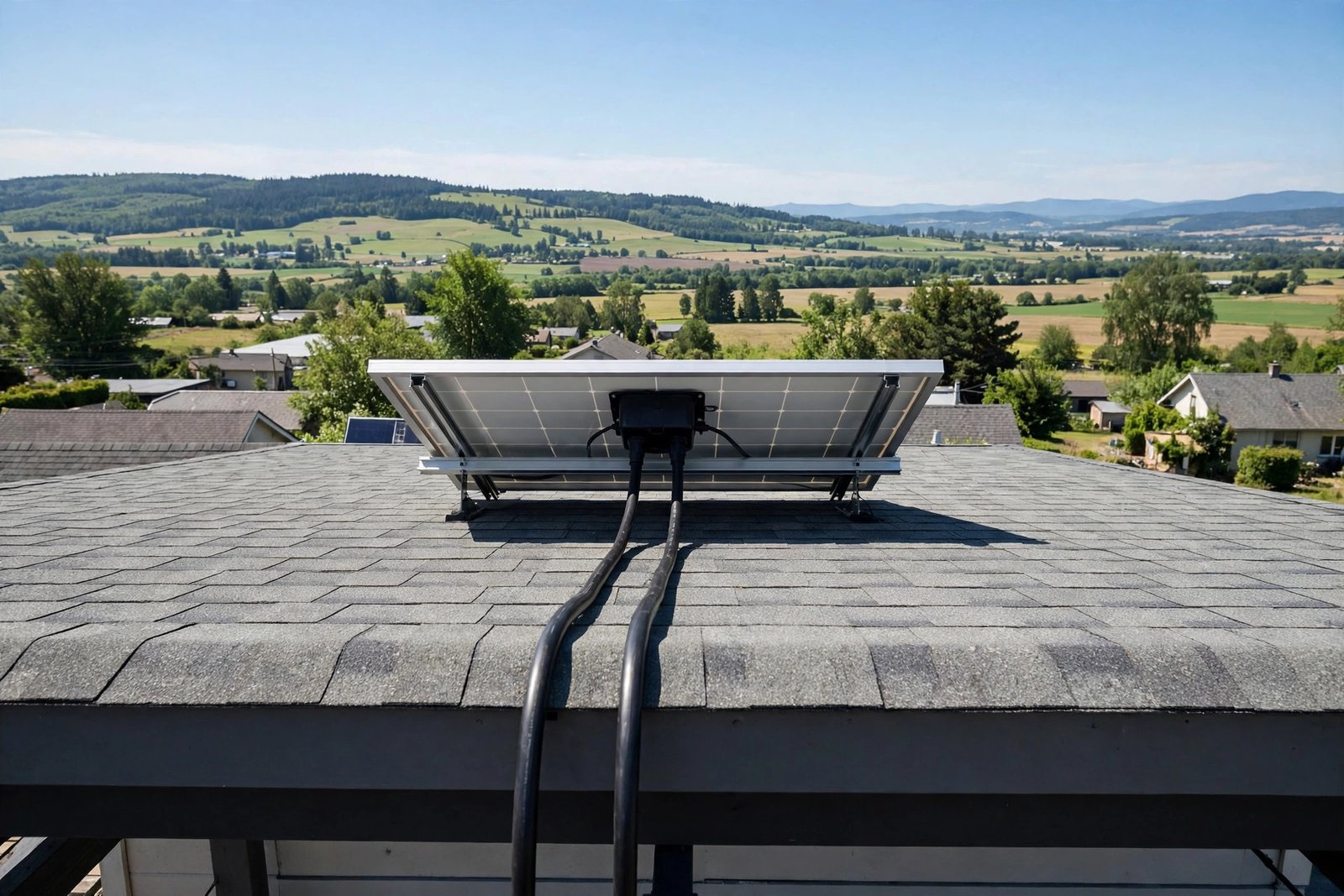
What Is a Solar Junction Box — and What Do Bypass Diodes Do?
Turn a solar panel over and you will find a small black plastic box fixed to the back, usually near the centre, with two thick cables coming out of it. That is the junction box. It is where the electrical connections from the solar cells inside the panel are joined to the cables that carry power to the rest of your system, and it holds the panel’s bypass diodes.
A bypass diode is a small electronic component that gives electricity an alternative path around a section of the panel. Solar cells in a panel are wired in series, like a chain — if one section stops producing, for example because it is shaded, dirty, cracked or damaged, it can block the current from the rest of the panel. Worse, the shaded cells can be forced to absorb power instead of producing it, which makes them heat up rapidly. That is how solar panel hotspots form.
Most modern panels have three bypass diodes, one for each third of the panel. When a section is shaded or faulty, its diode switches on and lets the current flow around that section, so the panel keeps producing power from the remaining two-thirds and the shaded cells stay cool instead of cooking.
The junction box also protects these connections from rain, dust and insects. It is sealed with a lid, sometimes with a rubber gasket, and the cables leave through sealed glands. When everything works as it should, the box stays only slightly warmer than the panel itself. When something goes wrong inside it, heat builds up fast — and that is when you get scorching, melting, and in rare cases fire.
Why Does a Junction Box Overheat?
Junction boxes do not overheat without a reason. In most cases, one of the following is behind it:
- A failed bypass diode. Diodes wear out. A diode can fail shorted, meaning it conducts all the time, or open, meaning it never conducts. A shorted diode lets current flow through it constantly, which generates heat. Repeated heating and cooling, lightning surges, and long periods of partial shading all stress diodes.
- Loose connections inside the box. The cell ribbons and cable terminals inside the box are held by screws, solder or spring clips. If one works loose over years of thermal expansion and contraction, the connection develops high resistance — and high resistance at one point means heat at that point. Our guide on fixing loose or corroded solar wiring explains why this is so dangerous.
- Corrosion from water getting in. If the box lid seal fails, or a cable gland cracks, rainwater can get inside. Water plus electricity plus metal equals corrosion, and corroded terminals run hot. This is common on older installations and on panels where the box was opened and not resealed properly.
- Poor ventilation behind the panel. Panels need airflow underneath to shed heat. If panels are mounted almost flat against the roof, or debris or a bird’s nest blocks the air, the whole back of the panel runs hotter — and the junction box suffers most.
- Prolonged partial shading. A chimney, antenna or tree branch that shades the same part of a panel every afternoon forces the bypass diode for that section to carry current for hours at a time, every day. Diodes are designed for this, but years of it shortens their life.
- Manufacturing defects or cheap components. Some low-cost panels use diodes rated too close to the panel’s actual current, or junction boxes with plastic that softens at lower temperatures. These tend to fail earlier, sometimes within the first few years.
- Damage during installation. A box that was cracked, overtightened or badly sealed during installation can let in water or lose its grip on the terminals, setting up a failure months or years later.
Heat makes the problem worse over time. A slightly loose connection generates a little heat, the heat expands and loosens the connection further, and the cycle repeats until something melts or burns. That is why catching it early matters.
Warning Signs of an Overheating Junction Box or Burned Bypass Diode
Most junction box problems give you warnings before they become dangerous. Watch for these:
- A sudden drop in power output. If one panel is producing much less than its neighbours, or your daily output has fallen without any change in the weather, a failed diode is a likely suspect. See our guide on panels not producing enough power for other causes to rule out.
- A whole string producing zero watts. A shorted diode or a melted connection inside the box can take an entire string offline. Our checklist for zero watts on a sunny day covers the other possibilities.
- A burning or chemical smell near the panels. Overheated plastic and burned electronics have a sharp, acrid smell that is hard to miss. If you can smell it from the ground or in the loft, treat it as urgent.
- Visible scorching, melting or discolouration. Look at the back of the panels if you can do so safely from a ladder or with binoculars. Brown or black marks around the junction box, a lid that looks warped or melted, or white or yellow staining on the panel backsheet near the box are all red flags.
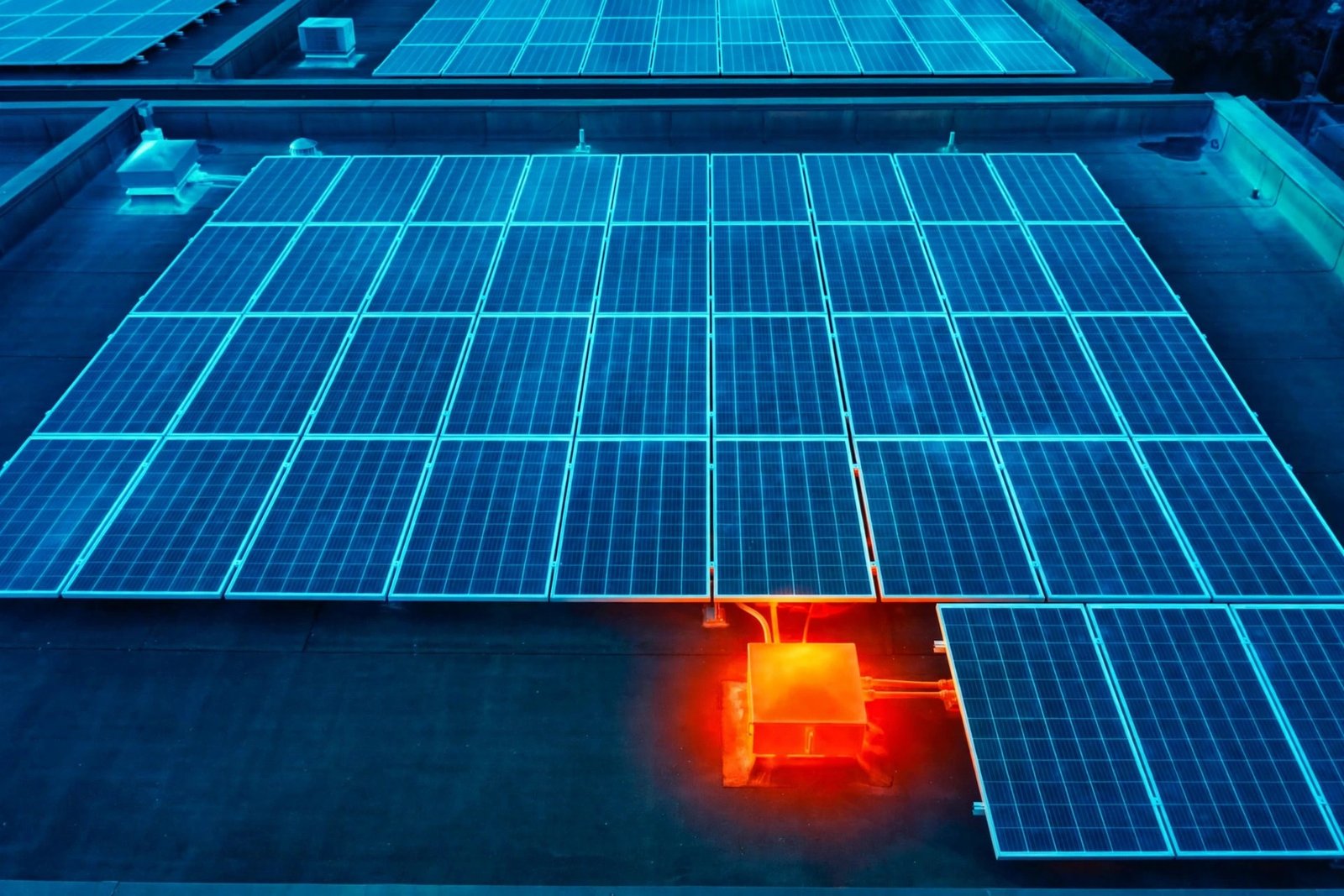
- A junction box much hotter than the others. On a sunny day, carefully feel the back of the panels near the junction boxes — or better, use an infrared thermometer. One box noticeably hotter than the rest is almost certainly faulty. A thermal camera makes this obvious in seconds.
- Inverter warnings or repeated shutdowns. A failed diode can cause earth faults or isolation faults, which the inverter detects and reports. If your inverter keeps shutting down or showing the same fault, the problem may be on the roof rather than in the inverter itself.
- One panel running far hotter than the rest. A thermal camera scan will show a faulty panel glowing brighter than its neighbours. Hotspots on the front of the panel and a hot junction box on the back often go together.
- Cracked or bubbled backsheet near the box. Extreme heat can blister or crack the white plastic backsheet of the panel around the junction box. If you see bubbling, the box has been running very hot for some time.
Any one of these signs is worth investigating. A burning smell or visible melting means you should shut the system down and call a professional the same day.
What Happens When a Bypass Diode Burns Out?
It depends on how the diode fails. There are two ways, and they cause different problems:
Diode failed open (it never conducts)
When a diode fails open, it stops doing its job. If the section of the panel it protects becomes shaded or damaged, there is no bypass path, so the shaded cells are forced to absorb power. They heat up quickly and can form a hotspot that permanently damages the cells, cracks the glass or burns through the backsheet. The panel may still produce power in full sun, so the problem can go unnoticed until the damage is severe.
Diode failed shorted (it conducts all the time)
When a diode fails shorted, it bypasses its section of the panel permanently — even in full sun. That third of the panel stops contributing power, so output drops by roughly a third, and the diode itself carries current all day, generating heat inside the junction box. A shorted diode is the more common cause of a visibly overheating or melting junction box, and it is also the more obvious one, because the power loss shows up straight away in your monitoring.
In either case, the panel is not safe to leave as it is. An open diode risks hotspot damage to the cells, and a shorted diode risks heat damage to the box and cables — and both can, in the worst case, lead to a fire on the roof.
Safety First: Never Open a Junction Box While the System Is Live
Solar panels produce electricity whenever light falls on them. You cannot switch a panel off by flipping a breaker — the cells themselves are the power source. A junction box can carry high DC voltage even on a cloudy day, and DC current is more dangerous than household AC in one important way: it does not switch off by itself, so an arc can keep burning once it starts. Follow these rules:
- Shut the system down before you go near the roof. Turn off the AC isolator at the inverter first, then the DC isolator, following your installer’s shutdown procedure. Our guide on how to safely reset your inverter explains the correct order.
- Cover the panel before opening the box. Even after shutdown, a panel in sunlight is still live at its terminals. A professional will cover the panel with an opaque sheet or work at night to make it safe. Do not open a junction box in daylight without covering the panel first.
- Verify with a multimeter. Before touching anything inside the box, check for voltage with a multimeter rated for DC. See our guide on how to test with a multimeter.
- Do not touch a box that is smoking, arcing or smells burnt. Keep clear, shut the system down from the ground if you safely can, and call a qualified solar technician or your installer immediately. If you see flames, call the fire service.
- Do not work on the roof alone. Use a proper ladder, wear non-slip shoes, and have someone on the ground. If you are not comfortable working at height, do not go up — hire a professional.
- Wear insulated gloves and eye protection whenever you handle panel wiring, even after shutdown, in case a connector is still live from another string.
How to Diagnose the Problem Safely, Step by Step
Most of the diagnosis can be done from the ground or from your monitoring app. Only a qualified technician should open the junction box itself.
Step 1: Check the monitoring data
Open your monitoring app and compare the panels or strings. A panel producing about a third less than its neighbours points to a shorted bypass diode. A panel producing nothing at all could be a melted connection, a failed diode, or a damaged cable. Note the pattern — it tells the technician where to look first.
Step 2: Look for visible damage from the ground
Use binoculars to inspect the backs of the panels if you can see them from a ladder or a neighbouring window. Look for scorch marks, a warped or melted box lid, discolouration on the backsheet, or cables hanging loose.
Step 3: Check for heat with an infrared thermometer or thermal camera
On a sunny day, scan the backs of the panels with an infrared thermometer, aiming at each junction box in turn. A healthy box is only a few degrees warmer than the panel surface. A box running 20 degrees or more hotter than the others is faulty. A thermal camera shows the same thing at a glance, and many solar technicians carry one as standard.
Step 4: Test the panel’s voltage and current
This is a job for a technician with the right equipment. With the panel disconnected and covered, they will measure the open-circuit voltage and compare it with the value on the panel’s label. A panel with a shorted diode typically shows about a third less voltage than it should. A clamp meter can also check the current in each string and find the one that is underperforming.
Step 5: Test the bypass diodes directly
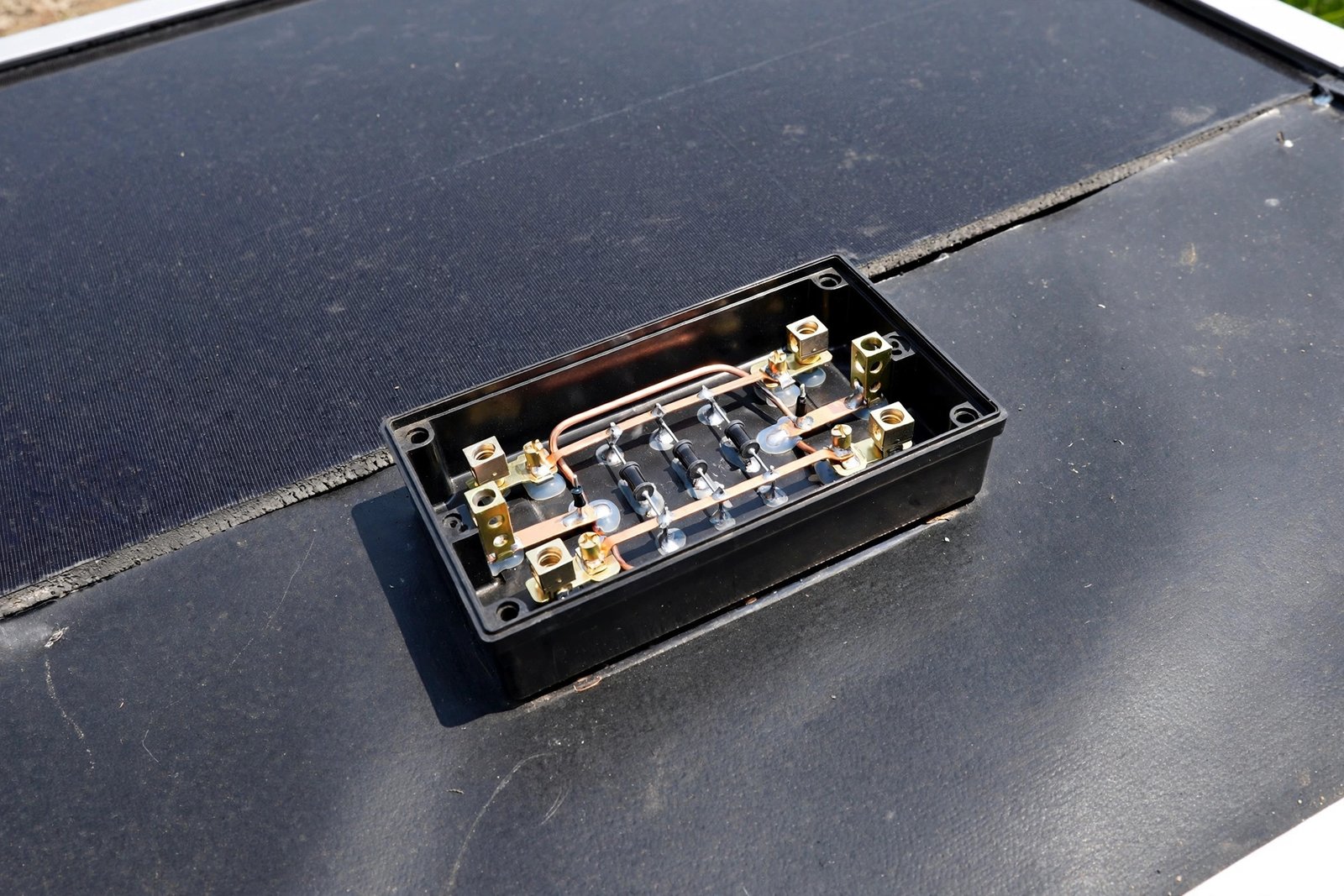
Once the panel is safely isolated and covered, a technician opens the junction box and tests each diode with a multimeter on the diode setting. A healthy diode conducts in one direction only. A shorted diode conducts in both directions, and an open diode conducts in neither. This test takes minutes and gives a definite answer.
Step 6: Inspect the connections and seals
While the box is open, the technician checks the terminals for looseness, corrosion and signs of arcing, and checks the lid seal and cable glands for cracks or water damage. Often the diode is fine and the real problem is a loose or corroded terminal that has been cooking for months.
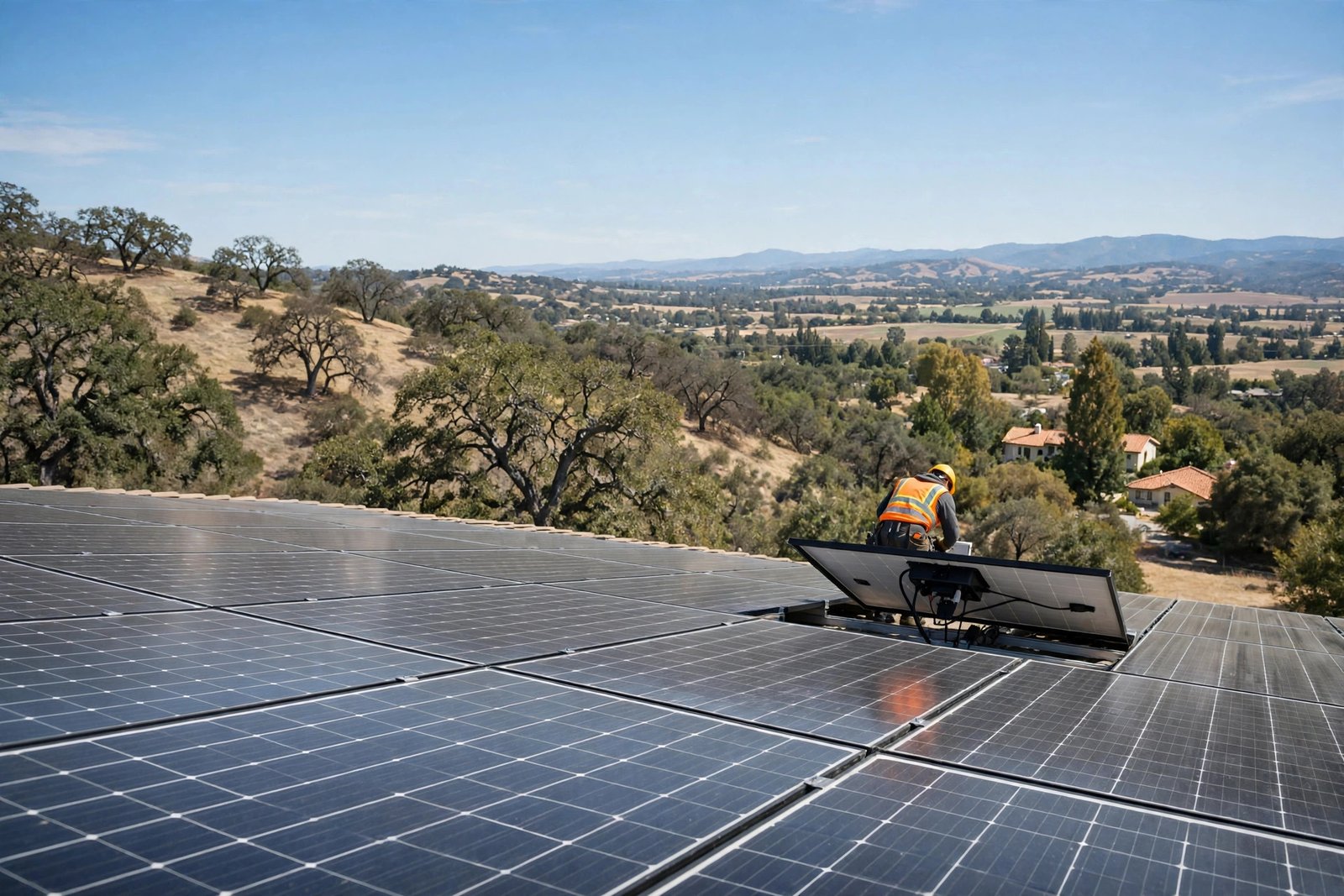
Repair Options: Diode Replacement, Junction Box Replacement, or New Panel?
What happens next depends on how bad the damage is:
Replacing a single bypass diode
If the box and terminals are in good condition and only the diode has failed, a technician can often replace just the diode. Diodes are inexpensive components, and on many panels they are held in spring clips or soldered to terminals inside the box, so swapping one is straightforward. The replacement must be rated for the panel’s current and voltage — using the wrong diode will fail again quickly. This is the cheapest repair and the best outcome.
Replacing the whole junction box
If the box itself is scorched, melted or cracked, or the terminals are damaged, the whole junction box may need replacing. Some manufacturers sell replacement junction boxes for their panels, and a technician can fit one, resealing it properly. This costs more than a diode swap but is still far cheaper than a new panel. It is only worth doing if the panel itself — the cells, glass and backsheet — is undamaged.
Replacing the panel
If the heat has damaged the cells, cracked the glass, blistered the backsheet or burned through the cell ribbons, the panel cannot be repaired safely and must be replaced. A melted junction box that has been running hot for a long time often means the panel behind it is damaged too. Our guide on whether you can repair a cracked solar panel covers the DIY-versus-replacement decision for other kinds of panel damage. If your panels are still under warranty, check with the manufacturer first — a failed diode or junction box is usually covered by the product warranty, but damage caused by poor installation or animal interference may not be.
What about a temporary fix?
There is no safe temporary fix for a burned bypass diode. Do not bypass the diode with a wire, do not tape up a melted box, and do not keep running a panel with a known hot junction box while you wait for a repair. If the panel is unsafe, the technician will disconnect it from the string so the rest of your system can keep running safely until the repair is done.
If the repair involves the cables or connectors leading into the box, our guides on how to replace a damaged MC4 connector and fixing loose or corroded solar wiring cover the related work — but again, this is a job for a qualified technician, not a first DIY project.
How to Prevent Junction Box Overheating
Most junction box failures can be avoided with a few simple habits:
- Keep panels clear of shade where possible. Trim overhanging branches and avoid placing anything that casts a regular shadow across part of a panel. Less shading means less work for the bypass diodes.
- Make sure there is airflow under the panels. Panels should be mounted with a gap of at least 10 to 15 centimetres above the roof surface so air can flow underneath and carry heat away. If your panels sit almost flat on the roof, ask your installer whether the mounting can be improved.
- Have the system inspected every year or two. A professional inspection should include a thermal camera scan of the array. It takes minutes and finds hot junction boxes, loose connections and developing hotspots long before they become dangerous.
- Watch your monitoring app. A panel that slowly drifts below its neighbours over weeks or months is an early warning. Check your monitoring at least once a month, and investigate any panel that drops suddenly.
- Keep the array clean. Dirt, leaves and bird droppings can shade part of a panel and force the diodes to work. A clean panel is a cooler panel.
- Do not let anyone open a junction box and reseal it badly. If a box has been opened for any reason, make sure it is resealed properly with a sound gasket and tight cable glands. Water getting in is one of the most common causes of corrosion and overheating.
Common Mistakes to Avoid
- Ignoring a small drop in output. A panel producing a third less than its neighbours is not a minor glitch — it is usually a shorted diode, and the heat it generates gets worse over time.
- Opening the junction box in daylight without covering the panel. The panel is live in sunlight. Opening the box without covering it first risks a serious shock and can damage the panel.
- Replacing a diode with the wrong rating. A diode rated too low will fail again quickly. Always match or exceed the original specification.
- Taping up a melted box and carrying on. Tape is not a repair. A melted box has already lost its weather seal, and the damage underneath is still there.
- Assuming the inverter is at fault. Inverter warnings caused by a faulty panel are common. Check the panels before replacing an inverter.
- Cleaning panels with a pressure washer. High-pressure water can force its way into junction boxes and cable glands, causing exactly the corrosion problem you are trying to avoid.
When to Call a Professional
Call a qualified solar technician or your original installer if:
- You smell burning near the panels, or you can see scorching, melting or smoke.
- A junction box is noticeably hotter than the others, or a thermal scan shows a bright hot spot.
- A panel has lost about a third of its output, or a whole string has stopped producing.
- Your inverter keeps showing the same fault, or it shuts down repeatedly.
- The panel’s backsheet is blistered, cracked or discoloured near the junction box.
- A diode or junction box needs replacing — this is not a DIY job, because the panel must be safely isolated and covered first.
- Your panels are still under warranty — an unauthorised repair can void it, so let the manufacturer or an approved installer handle it.
If you see flames or heavy smoke, shut the system down from the ground if you safely can, leave the area, and call the fire service. Do not try to fight a solar panel fire yourself — the panels stay live as long as light falls on them.
A professional repair usually takes under an hour for a diode swap and a little longer for a full junction box replacement. The cost is small compared with a new panel, and far smaller than the cost of fire damage to your roof.
FAQs
What causes a solar junction box to overheat?
The most common causes are a failed bypass diode, a loose or corroded connection inside the box, water getting in through a damaged seal, poor airflow behind the panel, and long periods of partial shading. Heat damage builds up over time, so a small fault can become a serious one if it is ignored.
What happens when a bypass diode burns out?
If it fails open, the section of the panel it protects has no bypass path, so shaded or damaged cells can overheat and form hotspots. If it fails shorted, that third of the panel stops producing power — output drops by roughly a third — and the diode itself generates heat inside the junction box, which can melt the box.
Can I replace a bypass diode myself?
Technically yes, but it is not recommended unless you are a qualified electrician with solar experience. The panel must be safely isolated and covered first, because it stays live in daylight, and the replacement diode must be correctly rated. For most homeowners, this is a job for a solar technician.
How do I know if my solar panel junction box is bad?
The clearest signs are a panel producing about a third less power than its neighbours, a whole string producing zero watts, a burning smell, visible scorching or melting around the box, or a box that feels much hotter than the others. A thermal camera scan or a multimeter test by a technician gives a definite answer.
Is a hot junction box a fire risk?
Yes. A junction box running far hotter than normal can melt its plastic housing, damage the cables and, in the worst case, ignite roofing material or the panel backsheet. It is rare, but it does happen — which is why a hot junction box should be treated as urgent, not as something to check next month.
Will a failed bypass diode void my panel warranty?
Usually no — a failed diode or junction box is normally covered by the manufacturer’s product warranty, which typically runs for 10 to 12 years. However, damage caused by poor installation, unauthorised repairs or animal interference may not be covered, so check your warranty terms and let an approved installer handle the repair if you are unsure.
Conclusion
The junction box is one of the smallest parts of a solar panel, but it does a critical job — and when it overheats, the consequences can be serious. A burned bypass diode can cut a panel’s output by a third, damage the cells, melt the box, and in rare cases start a fire. The good news is that the warning signs are clear: a sudden drop in output, a burning smell, visible scorching, or one box running much hotter than the rest.
Most of the diagnosis can be done safely from the ground — check your monitoring app, look for visible damage, and use a thermal camera if you have one. Leave the actual repair to a qualified technician: a diode swap is quick and cheap, a junction box replacement costs more but is still far cheaper than a new panel, and a panel with heat-damaged cells should be replaced. And remember the simple prevention steps — keep panels clear of shade, make sure air can flow underneath, and have the array inspected with a thermal camera every year or two. A few minutes of attention now can save you a panel, a string, or a roof.
Pingback: How to Fix a Roof Leak Around Solar Panel Mounts and Flashing - Solar Fixing Guide